About prices:prices on this page are US street prices in USD, last checked November 2026 for GPUs, Ryzen CPUs, and desktop RAM, and October 2026 for other parts. They are for reference only. Local prices differ by region and usually include VAT or sales tax, and availability changes quickly, so check the retailer before you buy.
Short answer: an RTX Spark desktop is worth it if you want CUDA, Windows, and more memory than a consumer GPU in one small box. It went on sale on November 18, 2026, from $4,399 with 64GB and $7,499 with 128GB. Published tests on the same chip in laptops reach 65 tokens per second on GPT-OSS 120B. If you do not need CUDA, a Ryzen AI Max+ mini PC costs far less. If your models fit in 24GB, a discrete GPU is much faster.
Quick Navigation:
What RTX Spark Is
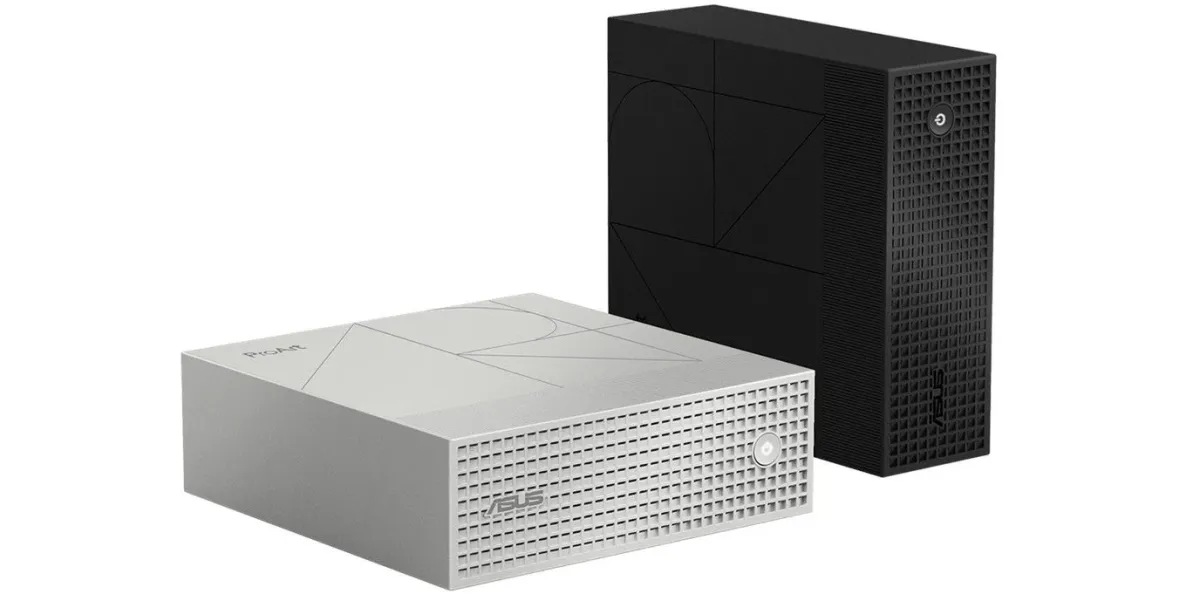
RTX Spark is NVIDIA’s Windows PC platform for local AI. NVIDIA announced the compact desktops as available on November 18, 2026 from ASUS, Dell, and MSI, with Acer, GIGABYTE, HP, and a Microsoft Surface Dev Box coming later.
| CPU | 20-core NVIDIA Grace (Arm) |
| GPU | Blackwell RTX, 6,144 CUDA cores |
| Memory | 64GB or 128GB unified LPDDR5X |
| Memory bandwidth | Up to about 300 GB/s |
| Desktop power | 140W |
| Networking | 10-gigabit Ethernet |
| Operating system | Windows 11 on Arm |
NVIDIA says the platform can run 120-billion-parameter LLMs locally. That is a statement about capacity. Speed depends on memory bandwidth, and at about 300 GB/s this is a big-memory machine rather than a fast GPU. Our unified memory guide explains why.
RTX Spark Desktop Prices
These are US prices as reported on launch week. Prices have already moved once, so check the retailer before you buy.
| Desktop | Memory / Storage | US Price, Nov 2026 |
|---|---|---|
| MSI EdgeMesa N AI+ | 64GB | $4,399 |
| MSI EdgeMesa N AI+ | 128GB | $7,499 |
| ASUS ProArt GR1X | 64GB / 1TB | $4,499 |
| ASUS ProArt GR1X | 64GB / 2TB | $4,999 |
| ASUS ProArt GR1X | 128GB / 2TB | Not published |
| Dell desktop | Up to 128GB | Not confirmed |
Sources: The Next Web and Notebookcheck.
The step to 128GB is expensive. On the MSI it adds $3,100, so decide what you will actually run before paying for it.
Published LLM Speeds
We have not tested these machines. We also found no independent token-speed review of the desktops yet, so the numbers below come from laptops using the same 20-core, 6,144-core chip. The desktops run at 140W and may be faster, so treat these as a conservative guide.
| Model | Test Setup | Generation | Source |
|---|---|---|---|
| Qwen3.6-35B-A3B | Surface Laptop Ultra, Ollama, 64K context | 89.2 tok/s | StorageReview |
| GPT-OSS 120B | MSI laptop, llama.cpp, 61GB GPU memory | 65 tok/s | MindStudio |
| gpt-oss:20b | Surface Laptop Ultra, Ollama, 64K context | 58.0 tok/s | StorageReview |
| Qwen3.8 Flash Next 125B | MSI laptop, llama.cpp, 81GB GPU memory | 33.7 tok/s | MindStudio |
| Qwen3 27B (dense) | MSI laptop, llama.cpp | 13.4 tok/s | MindStudio |
| Qwen3.8 27B | Dell XPS 16, llama-server, 8K prompt | 12.4 tok/s | StorageReview |
Full test details: StorageReview’s Surface Laptop Ultra and Dell XPS 16 reviews, and MindStudio’s MSI review. Quantization is not stated for most of these runs, so do not compare rows too closely.
The pattern is clear, though. Mixture-of-experts models run well, and dense models run slowly. GPT-OSS 120B is much larger than Qwen3 27B but generates about five times faster, because an MoE model reads only a small active slice of its weights for each token. A dense 27B model has to read all of them.
A discrete GPU is still far ahead when the model fits. StorageReview measured an RTX 5090 laptop with 24GB at about 2.3 times the Surface’s speed on models that fit in that memory.
What Fits in 64GB and 128GB
Plan on about 75 to 85% of total memory being usable for the model and its context.
- 64GB: 20B to 35B-class models such as Qwen3.8-27B. GPT-OSS 120B used 61GB in MindStudio’s test, so it is not a practical fit here.
- 128GB: GPT-OSS 120B, Qwen3.8 Flash Next 125B (81GB in the same review), and DeepSeek V4 Flash at its smallest quants, which need about 92GB.
- Too big for either: GLM-5.2 (223GB or more) and Mistral Large 4 (233GB or more).
How It Compares
| System | Memory | Bandwidth | Software | US Price |
|---|---|---|---|---|
| RTX Spark desktop | 64 to 128GB | up to 300 GB/s | CUDA, Windows on Arm | $4,399 to $7,499 |
| NVIDIA DGX Spark | 64 to 128GB | 273 GB/s | CUDA, Linux | from $4,999, 128GB about $6,950 |
| Ryzen AI Max+ 395 mini PC | 128GB | about 256 GB/s | ROCm, Vulkan | about $2,500 to $3,000 |
| Mac Studio M5 Ultra | 96 to 512GB | 1.2 TB/s | MLX, Metal | from $5,499 (96GB) |
| RTX 5090 (card only) | 32GB | 1,792 GB/s | Full CUDA | $6,000 to $7,500 |
Ryzen AI Max and Mac prices are from our October 2026 check. DGX Spark prices vary by manufacturer.
Against DGX Spark: the hardware is close, so the operating system decides it. Choose DGX Spark for a Linux workflow or code you will later deploy on NVIDIA servers. Choose RTX Spark if you want one Windows machine for AI and everyday work. MindStudio measured 65 tokens per second on GPT-OSS 120B against 50.6 on a DGX Spark, but other published DGX Spark results are near 61, so do not count on a large lead.
Against Ryzen AI Max+: the Ryzen box gives you 128GB with similar bandwidth for less than half the MSI’s 128GB price. You give up CUDA. If you only run models through Ollama, LM Studio, or llama.cpp, that may be the better deal.
Against Mac Studio M5 Ultra: the Mac has about four times the bandwidth and a path to 512GB, which makes it the stronger machine for large models. It has no CUDA.
Against a discrete GPU: if your models fit in 24 to 32GB, buy or rent a GPU. It is faster and also better for training. See our GPU spec comparison and best GPU guide.
The Windows on Arm Catch
Check your software before you buy, because this is the part most likely to cause problems.
- CUDA works. CUDA 13.4 added Windows on Arm support, and native Arm64 builds of llama.cpp and Ollama were used in the reviews above.
- WSL2 is the practical route for Python work. One test measured 65.1 tokens per second in WSL2 against 65.4 on native Windows. WSL2 defaulted to 14GB of memory on that machine, so raise the limit before loading large models.
- vLLM needs WSL. It does not run natively on Windows.
- Native Linux is not officially supported. NVIDIA’s spec page lists Windows 11 only. Community support is early, and one native Linux test ran at 13.9 tokens per second while plugged in because the GPU clock stayed low.
- Other x86 apps may need emulation. Check any niche tools, plug-ins, or drivers you depend on.
Who Should Buy One
Good fit
You want CUDA and Windows in one small box, you run 20B to 35B models or MoE models up to about 120B, and you value capacity more than peak speed.
Buy something else
Pick DGX Spark for Linux, a Ryzen AI Max+ box for the cheapest 128GB, a Mac Studio for models above 128GB, or a discrete GPU for training and fast inference on smaller models.
Wait a few weeks
If you are considering the $7,499 model, wait for independent desktop benchmarks unless you need it now. The 128GB premium is large, and the launch data is still thin.
Try the Model Before You Buy the Box
Rent a GPU for an afternoon on Vast.ai or RunPod (new users get a $5 credit through our link) and test the exact model you plan to run.
Referral links: signing up supports TensorRigs at no extra cost to you.
FAQ
Is RTX Spark good for local LLMs?
Yes, if you want CUDA in a small Windows box and your models fit in its memory. Published laptop tests show 58 to 89 tokens per second on 20B to 35B-class models and 65 tokens per second on GPT-OSS 120B. It is slower than a discrete RTX 5090 on anything that fits in the 5090’s VRAM.
How much does an RTX Spark desktop cost?
As of November 22, 2026, the MSI EdgeMesa N AI+ is $4,399 with 64GB and $7,499 with 128GB. The ASUS ProArt GR1X is $4,499 with 64GB and 1TB, or $4,999 with 64GB and 2TB. ASUS has not published its 128GB price, and we could not confirm a Dell price.
Should I buy the 64GB or 128GB RTX Spark?
Buy 128GB only if you specifically want 100B-class models such as GPT-OSS 120B, which used 61GB of GPU memory in one test. If you mainly run 27B to 35B models, 64GB is enough and saves about $3,100 on the MSI model.
What is the difference between RTX Spark and DGX Spark?
Both pair a Grace CPU with a Blackwell GPU and up to 128GB of unified memory. RTX Spark runs Windows 11 on Arm, while DGX Spark runs Linux-based DGX OS. If your work is Linux-first, DGX Spark is the simpler choice. RTX Spark has no official Linux support as of November 2026.
Can RTX Spark run Linux or vLLM?
Not officially. NVIDIA lists Windows 11 only, and native Linux is still experimental. WSL2 works well: one test measured 65.1 tokens per second in WSL2 against 65.4 on native Windows. vLLM needs WSL because it does not run natively on Windows.
How much memory bandwidth does RTX Spark have?
About 300 GB/s in theory, from LPDDR5X-9400 on a 256-bit bus, and ASUS lists up to 300 GB/s for the ProArt GR1X. That is about one sixth of an RTX 5090’s 1,792 GB/s and a quarter of a Mac Studio M5 Ultra’s 1.2 TB/s.
Related Reading
Comparing Local AI Hardware?